Get Started App
Registered members can download the FREE Get Started Apps. I initially implemented MySQL for this site and the Get Started App. The Get Started App is the project I used to compose articles about setting up VS Code and developing Node with Express and the Embedded JavaScript (EJS) view engine. I decided to migrate this site to PostgreSQL. Rather than replacing the MySQL Get Started App, I decided to add a PostgreSQL Get Started App. Both apps will run without a database but can integrate with either MySQL or PostgreSQL by configuring environment variables in the .env file.
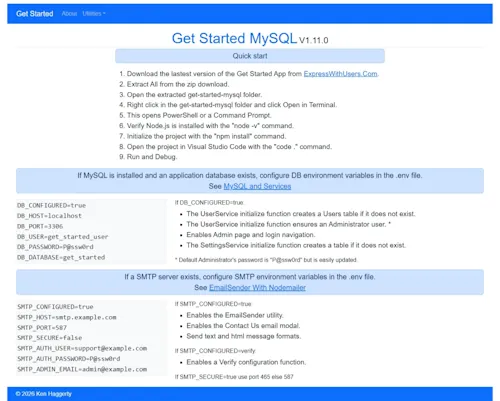
Integrating a database with Express JS is half the battle of getting started. I developed Get Started apps for MySQL and PostgreSQL. Registered users can download the apps from the Members tab on the main menu. You should review the articles in the Get Started Series from the Articles tab on the main menu. The Get Started apps require Node JS but will run without a database server. See Development Environment Setup. If you have a MySQL Server or PostgreSQL Server installed and created a project database, you can configure the environment variables in the .env file for the appropriate downloaded project. See MySQL and Services for help installing a MySQL Server and PostgreSQL and Services for help installing a PostgreSQL Server.
If a database is configured, the UserService initialize function creates a Users table if it does not exist and ensures an Administrator user. The SettingsService initialize function creates a settings table if it does not exist and enables edit contact us settings on the Admin page and displays the settings on the About page. Enables Admin page and login navigation.
Another critical feature of getting started is notifying the site administrator of events like contact us inquires and errors via email. The Get Started apps include the NodeMailer library and a custom EmailSender module. If you have an existing SMTP server, you can configure SMTP environment variables in the .env file to enable a Contact Us modal which sends the details to the site administrator. See EmailSender With Nodemailer.
I also included the utilities demonstrations from ExpressWithUsers.Com and implemented a hashed password for the Administrator user.